Chiral Audio help center

Install, activate, keep moving.

Installation, activation, license recovery, and practical control references for the Chiral Audio catalog. Use this page when you need to get running, fix a purchase or machine issue, or find a starting workflow without leaving the product context.

01

Start here.

Catalog operating facts

01.01
Facts

The operating model

Chiral Audio plugins are digital downloads. Checkout is handled by Paddle. License delivery and activation are handled by the Chiral license service at license.chiral.audio. The site starts checkout, but it does not generate licenses or store payment details.

One key per productEach product license has its own key. A bundle order should include one key for Foxfire, one for Autocatalysis, and one for Soliton.
Two machinesEach product license activates up to two computers used by the licensee.
Offline windowAfter activation, the plugin can run offline for up to 14 days between online checks.
macOS formatsProduct pages list macOS 11 or later with VST3, AU, and Standalone builds.
Windows formatProduct pages list Windows 10 or later with VST3 builds.
Refund windowRefunds are handled through Paddle according to the public refund policy.
02

Downloads.

Official installer links

02.01
Download

Use current installers

Download from official Chiral Audio links. Keep the purchase email, because it contains the license key and a durable path back to the installer links.

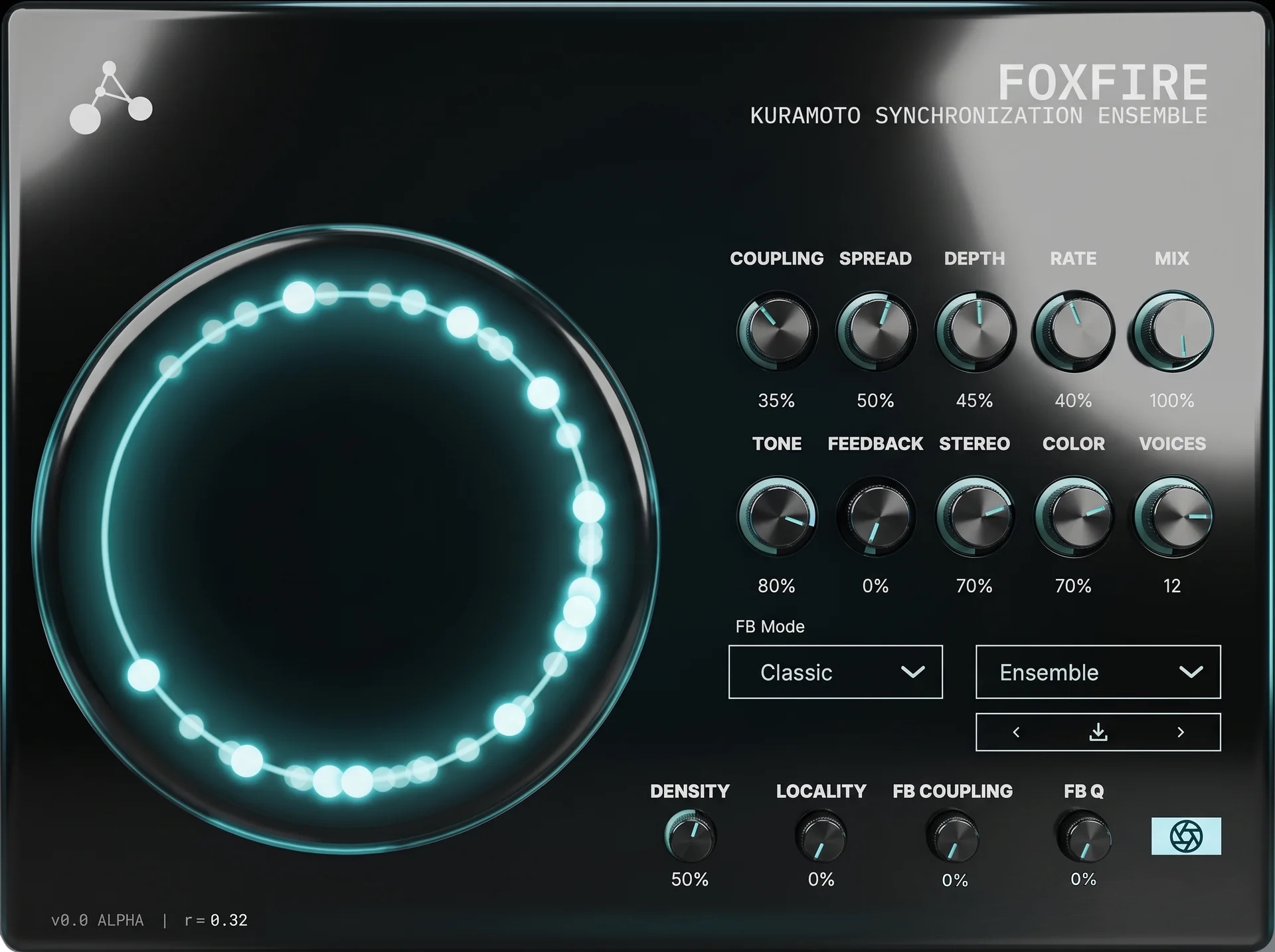
Foxfire Coupled-oscillator chorus and ensemble.
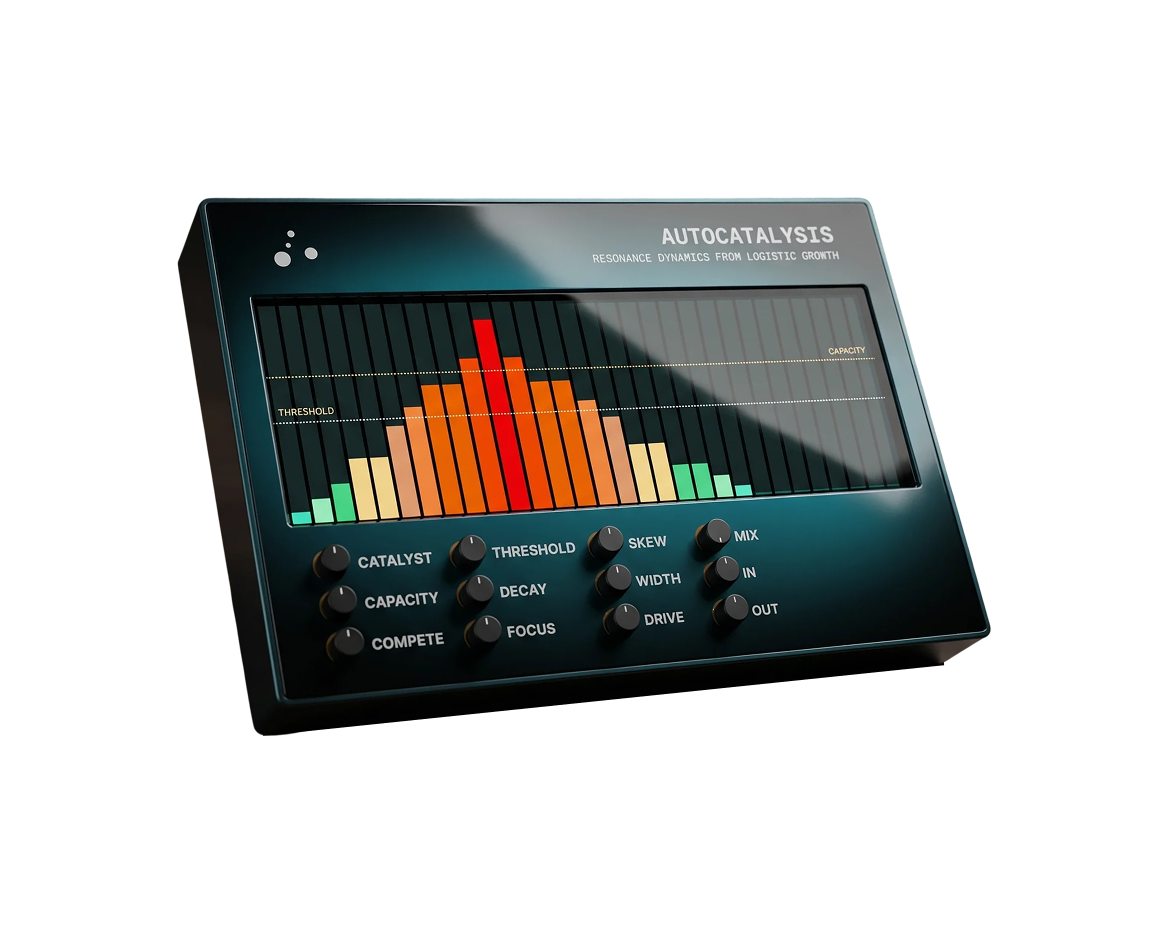
Autocatalysis Logistic-growth resonator and harmonic bloom.
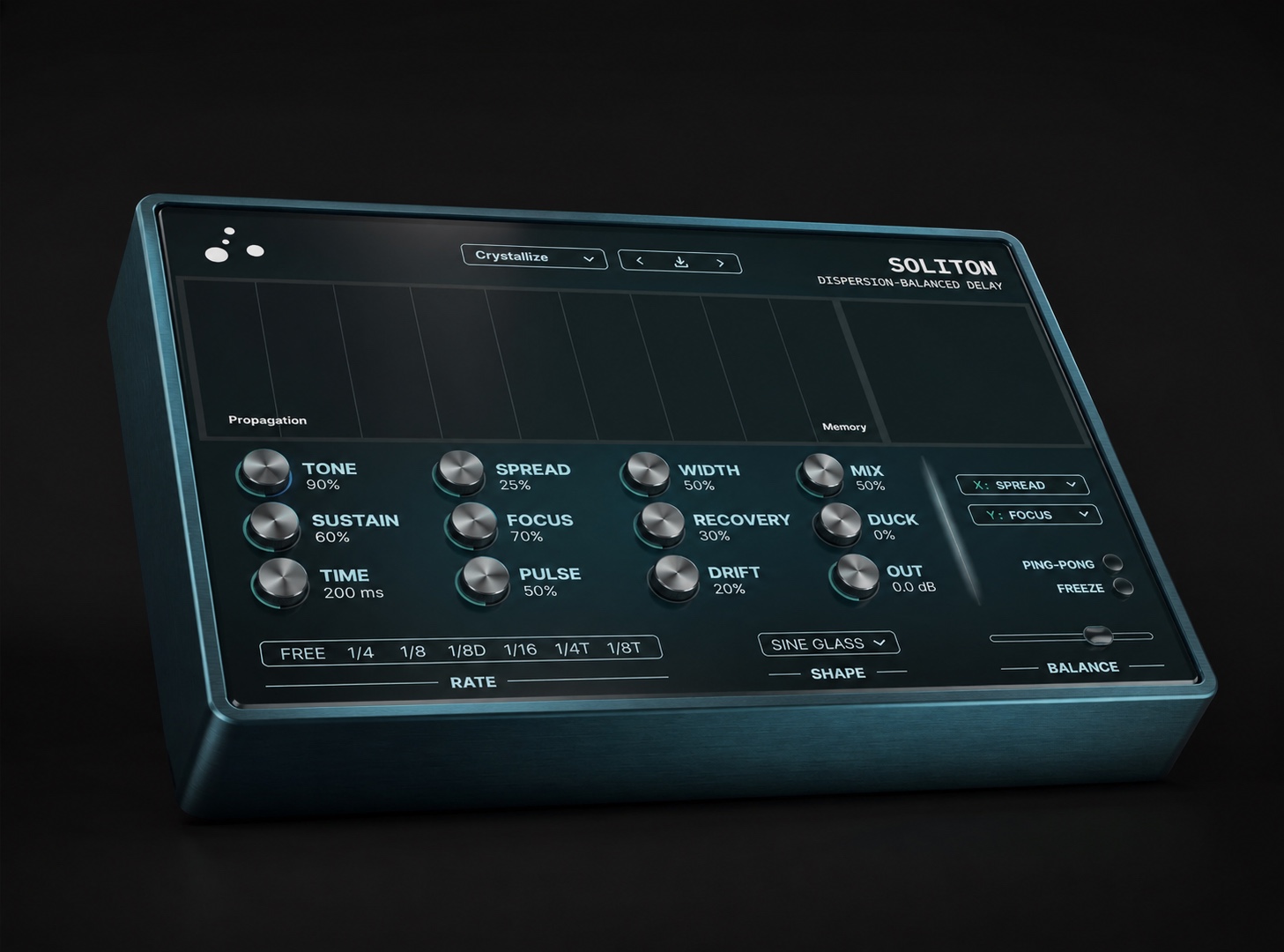
Soliton Self-sustaining delay with dispersion and stabilization.
03

Install.

Quiet, direct instructions

03.01
macOS

macOS install

  1. Download the macOS DMG for your product.
  2. Open the DMG and double-click the installer inside.
  3. Walk through the wizard. The installer asks which formats you want included — VST3, Audio Unit (AU), and Standalone are all checked by default. Uncheck anything you don't need.
  4. macOS will ask for your admin password to write the plugins into the system folders.
  5. Quit and reopen your DAW so it picks up the new plugin on its next scan. If your DAW has a plugin manager, run a manual rescan if the plugin does not appear on first launch.

The installer places files at /Library/Audio/Plug-Ins/VST3/, /Library/Audio/Plug-Ins/Components/, and /Applications/. Product pages list macOS 11 or later as supported.

03.02
Windows

Windows install

  1. Download the Windows ZIP for your product. The Windows download is a ZIP, not an installer.
  2. Extract the ZIP.
  3. Copy the .vst3 file into C:\Program Files\Common Files\VST3\.
  4. Restart your DAW and rescan VST3 plugins.

Logic and other AU-only hosts are not supported on Windows.

Unsigned VST3 note Windows builds are unsigned at launch. There's no installer to run, so SmartScreen typically isn't involved — most users will not see any prompt. If Windows quarantines the file or your DAW refuses to load it on first scan, right-click the .vst3Properties → check UnblockOK. Authenticode signing is on the roadmap. Read-me text is included as INSTALL-WINDOWS.txt inside the ZIP.
04

Activation & license recovery.

Keys, seats, offline checks

04.01
Activation

Activate the plugin

  1. Open the plugin in your DAW.
  2. Paste the full license key from the email, including dashes.
  3. Activate while connected to the internet.
  4. Keep the purchase email for future reinstallations.

The key format is CHRL-XXXX-XXXX-XXXX-XXXX. If a bundle email includes three products, use the matching key for the product you are opening.

04.02

Seat resets, lost keys, refunds

  • Seat limit: each product license activates up to two machines. If you have used both seats and need a third (replacing a computer or drive, moving studios), email [email protected] with the order or transaction ID and we will free a seat. A self-serve in-plugin deactivation menu is on the roadmap; until then, support handles deactivation.
  • Lost key: email from the purchase address when possible and include the order or transaction ID.
  • Offline use: after activation, the plugin runs offline for up to 14 days between online checks. If you are taking a machine off-network, activate first while connected.
  • Refunds: the public refund policy gives a seven-day window, subject to license revocation and the conditions stated there.
  • No key sharing: do not send license keys in bug reports. Use the order or transaction ID instead.
05

Foxfire.

Coupled-oscillator chorus

05.01

What to reach for first

Foxfire is a chorus built from up to sixteen coupled oscillators that share phase information through the Kuramoto mean-field model: \(\dfrac{d\theta_i}{dt} = \omega_i + \dfrac{K}{N}\sum_{j} \sin(\theta_j - \theta_i)\). Start by choosing the size of the population, then use Coupling to move the field from independent drift toward partial synchrony and lock. Depth and Rate set how obvious the modulation feels. Stereo and Mix place the field in the track.

The chassis splits the controls into a core row (always visible) and an advanced row hidden behind the aperture toggle in the upper-right. A live order-parameter readout (R) sits in the footer — useful while you set Coupling, since R names how coherent the population is at any moment.

ControlWhat it doesUse it when
CouplingSets how strongly each oscillator responds to the shared phase field — K, in the Kuramoto model. Low values drift independently; higher values pull the population toward lock. 0 – 1, default 0.35.Sweep this first. The useful area is often the edge where the field starts to cohere.
SpreadSets the width of the natural-frequency distribution across the population (the σ in g(ω)). Wider Spread means voices want to drift further apart, so Coupling has to work harder to lock them. 0 – 1, default 0.50.Raise for a wider, less obedient ensemble. Lower when you want tighter lock.
DepthModulation amplitude — how far the delay taps swing as the oscillators modulate the chorus. 0 – 1, default 0.45.Low values for doubling. High values for audible ensemble pitch motion.
RatePopulation's center frequency ω₀ — the average modulation speed. 0 – 1, default 0.40.Set the musical pace before fine-tuning Coupling.
VoicesEnsemble size. CPU scales linearly with voice count. 2 – 16, default 12.More voices for pads and wide washes; fewer for leads, guitar, or tighter doubling.
StereoStereo width — distributes voices across the left-right field. 0 – 1, default 0.70.Raise for width. Pull back when the part needs to stay centered or mono-compatible.
MixWet/dry blend. 0 – 100%, default 50%.Moderate for inserts; raise for sound-design and send-style use.
ToneLowpass cutoff on the wet signal so the chorus can sit warmer or brighter. 0 – 1, default 0.80.Darken bright sources before reducing Mix.
Feedback and advanced field controls
FeedbackReturns part of the wet signal into the chorus network for more resonance and edge. Range is capped low for stability. 0 – 0.4, default 0.Raise slowly. Use zero for clean ensemble movement.
FB ModeFeedback routing. Classic: summed wet feedback returns into the shared delay input — smooth, even chorus feedback. Resonant: each voice's tap feeds back into its own input — voices resonate independently, harmonically complex. Default Classic.Resonant when the chorus should take on metallic or flanger-like character.
ColorFeedback filter cutoff. Lower = darker, warmer feedback. Higher = brighter, edgier feedback. Audible only when Feedback > 0. 0 – 1, default 0.70.Use after Feedback is audible.
FB QQ factor of the feedback filter. Audible only when Feedback > 0. 0.5 – 20, default 0.5.Raise for narrow resonant emphasis; keep low for smoother feedback.
DensityPer-voice delay-time spacing across the population. Low = voices clustered close together, tighter and more comb-like. High = voices spread further apart, more spacious. 0 – 1, default 0.50.Lower for tighter comb-like motion, higher for a more spacious population.
LocalityCoupling neighborhood. Zero = global mean-field (all voices listen to all — classical Kuramoto). Higher = more local coupling, into chimera-state territory where coherent and incoherent regions coexist. Higher Locality requires more Coupling to lock the same population. 0 – 1, default 0.Use when you want complex partial synchronization rather than a single uniform lock.
FB CouplingCouples the audio feedback into per-voice frequency detuning, adding a feedback-driven dimension to the synchronization dynamics. Audible only when Feedback > 0. 0 – 1, default 0.Use with Feedback when you want the source material to push back on the modulation field.
Order meter (R)Live readout of the order parameter R. Near zero = incoherence, near one = full lock. Footer readout.Watch it while sweeping Coupling to find the transition zone.
Drift washHigh voices, low Coupling, medium Spread, wide Stereo, moderate Mix.
Threshold shimmerMedium Coupling, medium Spread, moderate Depth, slow Rate.
Locked motionLower Spread, higher Coupling, fewer voices, narrower Stereo.
06

Autocatalysis.

Logistic-growth resonator

06.01

Build the bloom

Autocatalysis is a network of sixteen tuned resonators arranged on a Bark-spaced filterbank. Each resonator's gain is governed by logistic growth: \(\dfrac{dx}{dt} = rx\!\left(1 - \dfrac{x}{K}\right)\) when the band's energy is above the nucleation threshold, and exponential decay below it. Bands present in the input self-amplify; bands absent decay. Catalyst controls how quickly the bloom starts. Capacity sets the ceiling. Compete changes whether bands grow together or push against each other.

At high Compete settings the network enters the Belousov–Zhabotinsky regime: competing resonators rise and fall in cycles, producing rhythmic spectral pulsation from a static input. The chassis exposes a live band-field display across the top — sixteen vertical bars showing each resonator's growth state, with horizontal reference lines for Threshold and Capacity.

ControlWhat it doesUse it when
CatalystGrowth rate. How fast harmonics bloom once Threshold is crossed. Louder bands grow faster (the autocatalytic part). 0 – 1, default 0.50.Raise until the bloom follows the performance instead of lagging behind it.
CapacityCarrying capacity — K, in the Verhulst equation. Maximum resonance boost before the S-curve self-limits. 0 – 1, default 0.70.Use as the safety ceiling before adding Drive or Compete.
CompeteInter-band competition (Lotka–Volterra coefficient α). Low = independent bloom across the spectrum. Mid = shared ceiling, spectrally fair. High = strongest band dominates and the network enters BZ pulsation. 0 – 1, default 0.Keep low for harmonic enhancement. Raise for motion, pulsing, and selective emphasis.
ThresholdNucleation threshold — the input level a band must cross before its resonator engages aggressively. 0 – 1, default 0.30.Raise on dense sources, lower on sparse or quiet material.
DriveSaturation intensity applied to each resonator as its growth state rises. Generates new harmonics through nonlinear processing. 0 – 1, default 0.30.Use after Catalyst and Capacity feel right. Drive changes the color, not the trigger logic.
DecayResonator release. How long harmonics ring after the input that triggered them stops. 0 – 1, default 0.50.Short for transient thickening, longer for ringing body and spectral tails.
FocusResonator Q range. Low = broad, warm, EQ-like. High = narrow, ringing, almost vocal-formant. 0 – 1, default 0.30.Lower for warm, broad enhancement; higher for more selective harmonic emphasis.
Tone, placement, and gain controls
SkewFrequency-axis tilt across the sixteen bands. Left = bass emphasis. Center = neutral. Right = treble emphasis. 0 – 1, default 0.50.Use when the bloom is useful but sits too low or too high.
WidthStereo decorrelation across the resonator field via alternating L/R band offsets. 0 – 1, default 0.Raise for width on pads and drums; keep at 0 when the enhancement needs to stay mono-compatible.
MixDry/wet parallel blend. 0 – 1, default 0.70.Low values for transparent enhancement, higher values for obvious bloom.
In GainInput gain. Pushes more bands across Threshold without changing Threshold itself. -24 – +6 dB, default 0.Adjust before Threshold if the whole plugin feels underfed or over-triggered.
Out GainFinal output level after the dry/wet mix. -24 – +6 dB, default 0.Level-match here so louder does not masquerade as better.
Band-field displayLive readout at the top of the chassis. Each of the sixteen vertical bars shows one resonator's growth state, with horizontal reference lines for Threshold (lower) and Capacity (upper). Display only.Watch it to see whether your knob settings are letting the network reach the regime you expect.
Subtle bloomModerate Catalyst, restrained Capacity, low Compete, low Mix.
Body from thin materialLower Threshold, medium Decay, broad Focus, careful Output trim.
Competitive pulseHigher Compete, longer Decay, enough Capacity for the bands to trade motion.
07

Soliton.

Dispersion-balanced delay v1.1

07.01

Hold the line without runaway

Soliton is a feedback delay where repeats stabilize instead of decay. The feedback loop holds a cascade of allpass dispersion stages (Spread smears each repeat; Smear Density picks how many stages run — Light, Medium, or Dense), a saturator (Focus drives, Shape picks the curve), and a dual-cut filter cluster (Lo Cut + Hi Cut with resonance and a 6 / 12 / 24 dB/oct slope selector). A dynamic stabilizer regulates loop energy so the line neither dies nor runs away — Sustain sets the target level, Return sets how quickly the stabilizer corrects toward it. The conceptual spine is the Korteweg-de Vries equation: \(u_t + 6u\,u_x + u_{xxx} = 0\).

The XY pad at center is the live performance surface — default axes are Spread (X) and Focus (Y), reassignable from the corner dropdowns. The drift halo only renders when Spread is on an axis, by design — it visualizes the dispersing field, and there is no field to draw if Spread is locked off-axis. The pad's indicator follows external parameter changes (Balance drag, preset recall, host automation), so the dot stays accurate even when you're driving the underlying dials directly.

New in v1.1: In pre-feedback trim, full Filter cluster replacing the v1.0 Tone knob, Clear Buffer panic gate, Smear Density selector (Light/Medium/Dense), expanded 19-division tempo grid, Filter Slope selector (6/12/24 dB), and Recovery renamed to Return. Upgrades land in place; v1.0 presets carry over.

ControlWhat it doesUse it when
InPre-feedback input trim. Sets the level entering the delay line, before the saturator and filter see anything. -24 – +6 dB, default 0.Pull down on hot busses to keep the loop clean; push up to drive the saturator harder for more grit on every repeat.
TimeDelay interval between repeats. Free-running by default. When Sync is on, Time follows the Delay Rate choice and the knob displays the rate label. 10 ms – 2000 ms, default 500 ms.Use for off-grid echoes, short smears, and manually performed delay moves.
Delay RateLocks delay timing to host tempo. Nineteen divisions covering 4 bars down to 1/64, with dotted and triplet variants at every common subdivision. Default Free (off), 1/8 when engaged.Use when repeats need to sit on the arrangement grid. Picking a rate from Free mode auto-engages Sync.
SpreadAllpass dispersion intensity. Widens the dispersive field so repeats smear, bloom, and lose their simple delay-line shape. Counterbalanced by Focus. 0 – 1, default 0.50.Raise for wash, haze, and widening motion.
FocusSaturation drive that re-concentrates what Spread has dispersed and adds harmonic richness. Balanced against Spread for stable soliton-like repeats. 0 – 1, default 0.50.Raise when the field has become too diffuse or needs a sharper return.
SustainStabilizer target energy. Higher = louder, more persistent self-sustaining repeats. At 0, repeats decay naturally — Soliton behaves like a conventional delay. 0 – 1, default 0.40.Raise until repeats hold. Pull back when the delay needs to clear naturally.
Lo CutHighpass cutoff inside the feedback loop. Cuts everything below this frequency on every repeat. 20 Hz – 20 kHz, default 20 Hz.Raise to keep low end tidy when stacking long tails. Drag the left handle on the filter visualisation, or the dial.
Hi CutLowpass cutoff inside the feedback loop. Cuts everything above this frequency on every repeat. 20 Hz – 20 kHz, default 20 kHz.Lower to darken the tail across repeats. Drag the right handle on the filter visualisation, or the dial.
Filter MixWet/dry on the filter cluster itself. 0 – 1, default 0.At 0 the filter is bypassed (loop runs as if the filter were not there). Raise to bring the filter into the loop. Default off so legacy v1.0 sessions are unchanged.
MixDry/wet blend. 0 – 1, default 0.50.Level-match after changing Sustain, Shape, or Focus.
OutputFinal output level after the dry/wet mix. Does not affect the feedback loop. -24 – +6 dB, default 0.Trim independently of the loop's internal balance.
Stability, space, and performance controls
BalanceSingle-knob macro across Spread and Focus. 0 = full Spread / no Focus (ethereal, dissolving). 0.5 = balanced soliton. 1 = full Focus / no Spread (sharp, locked, aggressive). Moves both Spread and Focus with it; the slider thumb itself also follows whenever either underlying dial moves, so the macro view stays accurate. 0 – 1, default 0.50.Use when you want one gesture between diffusion and crystallization.
DriftAllpass coefficient modulation depth. The dispersing field gains its own slow life. 0 – 1, default 0.20.Raise for shimmer and movement inside sustained repeats.
WidthStereo decorrelation between L/R allpass coefficients. 0 – 1, default 0.50.Raise for wide beds; lower for mono-safe or center-focused work.
ReturnStabilizer correction speed. Three regimes: slow / organic, quick-lock, pumping. Renamed from Recovery in v1.1 — same parameter. 0 – 1, default 0.30.Lower for organic settling, higher for tighter lock or pumping motion.
DuckSidechains the wet/dry mix to the dry input envelope. Wet ducks while you play, swells back when you stop. Modulates the mix ratio, not the wet signal — keeps the stabilizer out of a feedback loop with the ducker. 0 – 1, default 0.Vocals, leads, and busy parts where repeats should stay out of the way.
FreezeLocks the current loop state indefinitely. The delay line stops accepting new input and the stabilizer holds the captured tone. The propagation panel gains a frosted border while Freeze is on. On / off, default off.Engage after the tone blooms, then perform Mix, Output, or the XY pad.
Ping-PongSquare-wave gain modulation at the delay frequency, applied to L/R. Pseudo-stereo bouncing from a mono core, with smooth transitions. On / off, default off.Rhythmic stereo motion without adding another delay.
Clear BufferMomentary button beside the visualisation panel. Instantly empties the delay line, wrapped in a 5 ms cosine ramp so the wipe is click-free, with a short hold so the cleared state lands cleanly. Re-trigger safe — rapid clicks restart the envelope without artefacts. New in v1.1.Use as a panic during runaway, or as a performance gesture during heavy Sustain passages.
Smear DensityPicks how many cascaded allpass dispersion stages the loop runs through. Light (2 stages): preserves transient attack, yields coloured discrete echoes at high Spread. Medium (4 stages): hybrid. Dense (8 stages, default): the canonical continuous soliton wall. Independent from Spread intensity. New in v1.1.Light for articulated coloured echoes; Dense for continuous gauzy smear; Medium for the middle ground.
Filter SlopeSteepness of the Lo Cut and Hi Cut. 6 dB/oct (default): transparent, no resonance peak — matches v1.0 Tone character. 12 dB/oct: standard biquad — Lo Res and Hi Res handles start to bite. 24 dB/oct: steep cascade with strong resonance, for fully-sculpted vocal-like tails. New in v1.1.6 for transparency, 12 for everyday filter feel, 24 for aggressive sculpting.
Lo Res · Hi ResResonance peak at the Lo Cut and Hi Cut frequencies. At 12 or 24 dB slope, raises a peak right at the cutoff. At 6 dB slope the resonance handles are inert by design (a 1-pole filter has no Q). 0 – 1 each, default 0 each.Drag the curve handles vertically on the filter visualisation. Use sparingly at the top — gets pingy.
ShapeSaturator family inside the feedback loop. Tanh Warm: soft, classic. Asym Tape: even-harmonic grit. Sine Glass: crystalline, opens the high end. Fold Metal: wavefolding cascade. Per-mode drive scaling. Default Tanh Warm.Warm for utility, Tape for grit, Glass for brighter edge, Fold for destructive sound design.
Pulse · Pulse RateRhythmic scaffold. When Pulse depth > 0, every Pulse Rate division the dispersion drops and the freeze gate opens — the line surges and gates in time. Independent grid from Delay Rate. Always tempo-locked. 0 – 1 depth, default 0. Nineteen rate divisions, default 1/8.Use when the repeats should surge, gate, or destabilize in time.
XY padPerformance surface for moving two assigned parameters at once. Default X = Spread, Y = Focus. Reassignable from the corner dropdowns. Modifier keys: Shift = fine, Cmd = snap. Double-click resets. The dot follows external param changes (Balance drag, preset recall, host automation). Assignable axes.Record it as automation once the base delay is stable.
Balanced delayCentered Spread and Focus, moderate Sustain, Filter Mix at 0, medium Mix. The stabilizer holds the line at a steady level.
Frozen bedStable loop, wider Width, Freeze engaged after the tone blooms. The propagation panel picks up a frosted border. Clear Buffer resets to silence.
Ducked repeatsHost sync, moderate Sustain, Duck raised until the dry part clears. Wet steps out during dense passages, returns in the gaps.
Filtered bedSpread and Focus near 0.50, Sustain raised, Filter Mix at 0.6, Hi Cut pulled to ~6 kHz, slope at 12 dB. Each repeat loses a bit more top end.
Articulated washSpread at 0.7, Smear Density on Light, Sustain at 0.6. The two longest allpass stages keep the transient attack readable while still smearing tails.
08

Troubleshoot.

Checks before support

08.01
Checklist

Plugin not showing up

  • Confirm you installed the correct format for the host: AU or VST3 on macOS, VST3 on Windows.
  • Restart the DAW after installing.
  • Run the DAW's plugin rescan or plugin manager if it has one.
  • On Windows, check the instructions in INSTALL-WINDOWS.txt if the file was blocked or quarantined.
08.02
Checklist

License key rejected

  • Copy the key directly from the email, including dashes.
  • Use the key that matches the product currently open in the DAW.
  • Confirm the computer is online for first activation.
  • If both seats are already used, email support with the order or transaction ID.
08.03
Checklist

No sound or not enough effect

  • Check the host track routing first. Bypass the plugin and confirm the dry signal passes.
  • Check Mix, Output, and any host-level wet/dry control.
  • Foxfire — sounds static, no motion: Coupling is in the lock zone. Pull it back into the transition area where the chorus breathes between coherent and scattered.
  • Foxfire — Feedback knob inert: Color, FB Q, and FB Coupling are gated by Feedback. With Feedback at 0, those three do nothing by design.
  • Foxfire — chorus feels mono: Stereo is at 0. Push it up.
  • Foxfire — advanced controls missing: Density, Locality, FB Coupling, and FB Q live behind the aperture toggle in the upper-right of the chassis.
  • Autocatalysis — nothing blooming: Threshold above the loudest material in the signal. Watch the band-field display — no bars are crossing the lower reference line. Drop Threshold or push In Gain.
  • Autocatalysis — it's screaming: Capacity too high, or Threshold too low. Pull Capacity back first; it's the ceiling.
  • Autocatalysis — it started pulsing on its own: Compete is in the BZ regime. Pull Compete back if unintended; or commit to it — BZ is the most distinctive thing the plugin does.
  • Autocatalysis — stereo collapses on mono check: Width > 0. Drop to 0 for mono compatibility.
  • Soliton — repeats just decay like a normal delay: Sustain at 0. Push it up — the self-sustaining behavior comes from the stabilizer.
  • Soliton — collapsing into mush: Focus too low or Spread too high. Bring the two back into balance, or center the Balance macro. Or set Smear Density to Light — fewer dispersion stages keeps the source more articulated.
  • Soliton — screaming or running away: Focus and Sustain both pushed hard. Drop one, or hit Clear Buffer to wipe the loop instantly without zeroing the knobs.
  • Soliton — pumping audibly: Return is high. That's a regime, not a fault — pull Return back for clean repeats.
  • Soliton — Time knob looks active but doesn't respond: Sync is on. Click on the Time knob and Sync flips off, or click the Free pill in the Delay Rate control to toggle Sync off explicitly.
  • Soliton — filter knobs do nothing: Filter Mix is at 0 — the filter cluster is bypassed. Raise Filter Mix to bring it into the loop. Default is 0 so v1.0 sessions are unchanged.
  • Soliton — resonance handles don't raise a peak: Filter Slope is at 6 dB. A 1-pole filter has no resonance by design. Flip slope to 12 or 24 dB and the Lo Res / Hi Res handles become active.
  • Soliton — v1.0 preset sounds different in v1.1: Legacy Tone values map onto Filter Mix at slope = 6 dB. The audio chain is identical at slope = 6, but if a preset relied heavily on Tone, you may want to rebuild it using the new Filter controls.
  • Soliton — XY pad halo isn't showing up: both pad axes are assigned to controls other than Spread. Reassign at least one to Spread.
09

Support.

Make the first email useful

09.01
Contact

Email support

For purchase, license, download, or plugin issues, email [email protected]. Include enough context to reproduce or identify the issue.

Activation or purchaseOrder or transaction ID, purchase email, product name, and what happened. Do not send the license key.
Plugin bugOperating system, DAW and version, plugin name and version, format loaded, source material type, and steps to reproduce.
Install problemmacOS or Windows, product downloaded, host, visible error text, and a screenshot if there is one.
Sound problemProduct, preset or control area involved, dry/wet routing, and a short audio example if it helps.

Still blocked? Send the facts.

Send the order or transaction ID for purchase issues, and include the operating system, DAW, plugin name, plugin format, and steps to reproduce for plugin issues. Screenshots or short audio examples help when the problem is visual or audible.